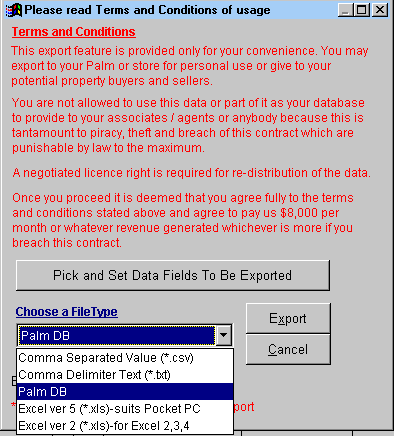
Choose a File Type you want to export the listing.
Select Comma Separated Value (*csv) or Comma Delimiter Test
(*txt) to export to text file.
Select Palm DB to to export to Palm.
Select Excel ver 5 (*xls)-suits Pocket PC for Pocket PC
Select Excel ver 2 (*xls)-for Excel 2,3,4 to export to Microsoft
Excel.
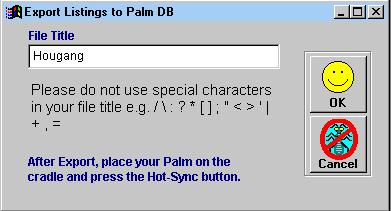
After keying the file title, click 'OK'.
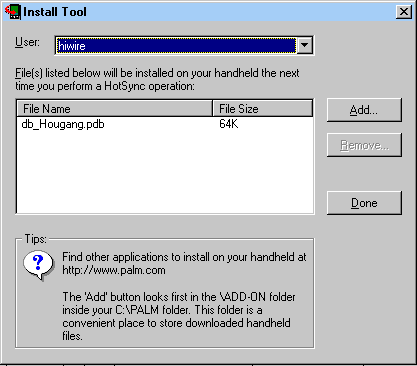
Click 'done' and the next time you place your Palm on the cradle and press the Hot-Sync button, the DB program will be loaded to your Palm.
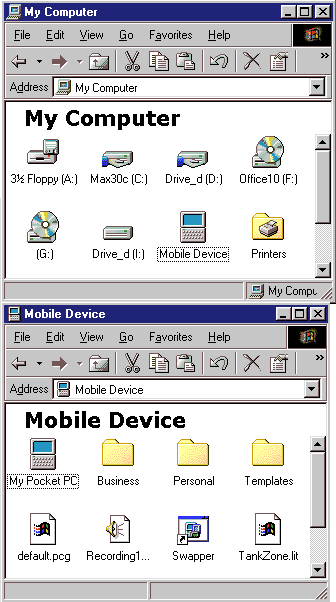
Select Excel ver 5 (*.xls)-suits Pocket PC. After exporting, double-click My Computer, plug the Pocket PC into the cradle, then follow by double-clicking Mobile Device then drag the excel file into Business folder or any folder that you have created. The Mobil Device will only appear after you have install the Pocket PC CDROM from Microsoft that came with your purchase of Pocket PC. The Business folder will only appear when your PocketPC is plugged into the cradle.
[Back]